
If you need to deploy your Platform on your infrastructure/network or on the cloud, you need to download the relevant version of the Platform based on your Hypervisor.
Platform is ready out of the box for the following Hypervisors:
All you need to do is to download your Hypervisor version of the Platform VM.
Open a web browser and go to the link we have emailed you.
Select the VM based on the Hypervisor you have previously chosen:
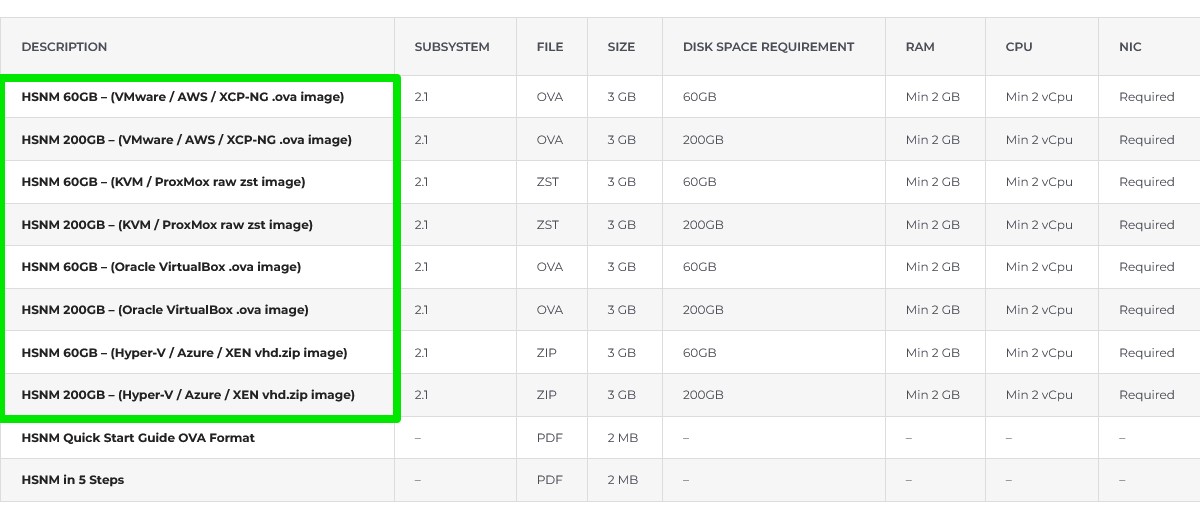
Then follow the official vendor’s guide for importing the Platform VM:
Once you have the Platform VM imported and run into your Hypervisor, the following message will appear on the console:
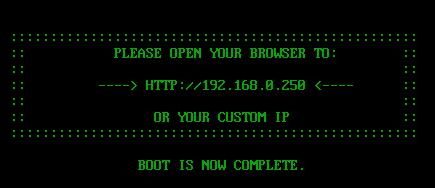
Now you can login into Platform to configure it by connecting, through a web browser, to http://192.168.0.250
Warning Do NOT set up the IP address 192.168.0.250 on the PC used to configure Platform because this is the default Platform IP address.rnrn
Warning Make sure your PC can reach the default Platform network subnet 192.168.0.0/24
Warning Suppose you are not able to reach Platform through IP 192.168.0.250. In that case, we suggest to run the Platform VM locally on your PC following the previous steps from point 1 to point 5, set the IP address based on your infrastructure or cloud network, turn the Platform VM off and then migrate it to the production server using your Hypervisor dedicated tool.